
RoboKiller Review 2020
- Easy to Download
- Stops spam text messages as well
- Fun to Choose or Create an Answer Bot
- Has neighbor spoof blocking
- There are over one million spammers on their list of calls to block
- The Answer Bot features only works if a live person is making the call, otherwise the call is just blocked
- There’s no indication the App is running unless you open it and see the blocked calls


Pricing and Features
$24.99 per year after a 7-day free trial. If you do not cancel before the free trial ends, a credit card you provide upon set-up will be charged. You may cancel your subscription at any time, but you will not receive a refund.
After downloading the App, it asks you for your contact information, so as to not block calls you want.
There is a small set-up process where the spam calls are set up to use the bots. You can pick a recording (or bot) or create your own. This is designed to waste the telemarketers time and discourage them from calling back
Spammers are automatically added to your block list without your phone ever ringing. You can go into the App later, review the calls and unblock the number if needed.
They claim to reduce spam by 90% in the first 30 days.
Ease of Use
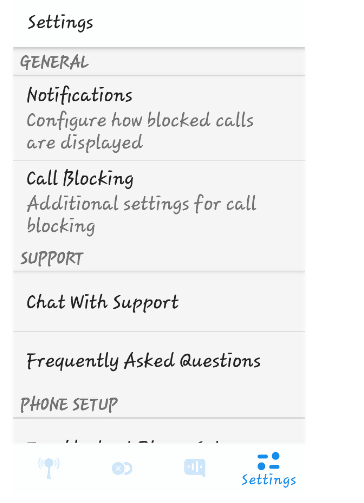
Setting up the App was easy – provide a credit card for the billing and then browse the settings. There are very few settings. You can indicate whether you want to be notified when calls are blocked and what to do with different kind of spam calls.
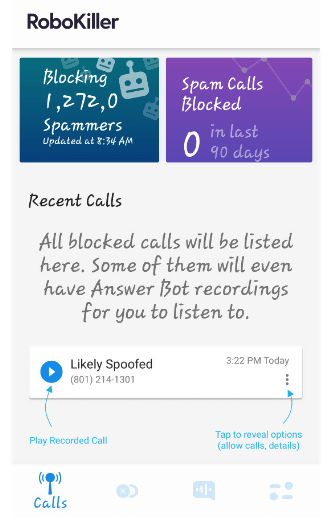
The landing page lists the spam calls and options with what to do with them. You can put a number back on the allowed call list with a click.
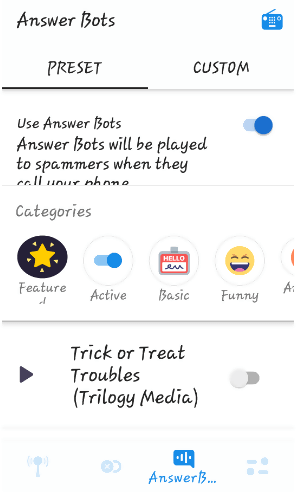
The funniest feature of this App is the bots, which are pre-recorded messages that will play if a live person calls you. We had a good time listening to a bunch of them. You have the option of picking a bot from the list or creating your own. If you want to create a custom bot, you need to download an additional feature.
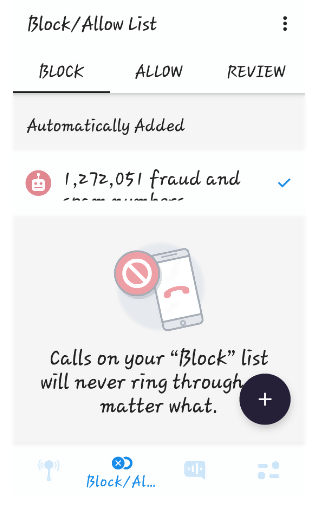
The Block/Allow List has a “review” tab where you can look at all your recent calls and click Allow or Block.
Robokiller iOS product
This product is available in the Apple Store. The iOS product shows a free app to check it out, but if you want to use the App there is a monthly fee. It is compatible with the iPhone, iPad and iPod Touch. The Apple Store shows a monthly fee after a 7-day free trial. With Family Sharing set up, up to six family members can use this app.
Robokiller Android product
This App was tested on an Android phone using Verizon service and worked as advertised. It shows a yearly charge after a 7-day trial period. Your Android phone has a way to block calls and I’ve been doing this for a while. I did get a call that when googled turned out to be spam, so I may need to adjust some settings, or it wasn’t a call on the Apps list.
Customer support
You can live chat with support on the App. They advertise live customer support 7 days a week.
There are Frequently Asked Questions that addressed any questions I had. The website has a blog that has more bots that people share as well as articles on spam laws and call blockers.
There are questions that address all major carriers.
Bottom line
I kept getting an Error saying “There was a problem retrieving the Calls li…” This may be related to my slow internet connection. I got stuck a few times and had to close the app and restart it. I have a lot of calls blocked, and I saw a call come in that was a neighbor spoof and the app did not activate. There is a Frequently Asked Question that handles this scenario. There’s also no indication on my home page that the App is running. I have a lot of spam calls blocked on my phone and my test period only showed one call that had the potential to be blocked.
The Bots are hilarious and almost worth the price of the subscription alone. If you are getting a lot of robocalls, I’d definitely check this one out.